alexa

ID:
Hiển thị các bài đăng có nhãn Gadgets and Gizmos. Hiển thị tất cả bài đăng

Thứ Ba, 5 tháng 8, 2014

New Tech Tuesday!

It's the first Tuesday of the month which means it's New Tech Tuesday!

This month we are going to focus on fun new Tech that is designed to make working in your kitchen a little easier.

The Smarter Microwave - with Accupop

Now a microwave, while convenient, is nothing new. However, this particular microwave has several features that make it a cut above most microwaves. This microwave has a feature that allows you to steam cook vegetables, fish or rice with a provided steamer. This feature also converts to allow steam cleaning.  It also features 'sensor cooking' which adjusts cooking times based on the food itself. It also has the Accupop technology, which adjusts popcorn cooking time using sound sensors. That's right, it listens to your popcorn as it cooks and when the popping slows down it recognizes that this means the popcorn is almost done. 
It may seem frivolous but burned popcorn can stink up your whole house and put a serious damper on movie night. 

At Home Sous Vide Machines

If you've never heard of Sous Vide (pronounced Sue Veed), don't worry you are not alone. The only placed we'd ever seen it before was when chefs got particularly adventurous on Top Chef. However this method for cooking meat is gaining popularity, especially now that Sous Vide machines are available for home cooks.

Sous Vide is the process of cooking food by placing it in a vacuumed sealed bag and keeping it at a steady temperature. This usually means cooking it in hot water. So what's so great about Sous Vide? T. Susan Chang from NPR's Kitchen Window has the answer:
Why would you want to do this? Because careful temperature control results in a kind of protein sorcery. You can get perfectly cooked delicate fish because it can't dry out or overflake. You can coax meats into meltingly soft braises because the protein never gets hot enough for the fibers to turn to string. You can get eggs that are never rubbery. You can melt the layers in pork belly without liquefying them in the process. You can even keep chocolate from losing its glossy temper when melted.

Find Chang's entire article here on NPR's Website. Cooking sous vide at home without any special equipment is possible, however it can be difficult to keep the water at a steady temperature for the length of time it takes to cook your meat. You can buy Sous Vide Circulators which help regulate the temperature for long periods of time while circulating the water to keep it from boiling down. These are less bulky than the Sous Vide Machines.


Sous Vide Circulator
image via Serious Eats 


Sous Vide Machine


Smart Refrigerators

The newest technology in refrigerators allows them to do so much more than just keep things cool. The smart refrigerators have touchscreens which allow you to make shopping lists and even keep track of expiration dates for foods. LG is working to create the ability for users to text their refrigerator to ask questions like "Are we out of eggs?" or "How long until the milk expires?' from their smart phone, even while in the middle of a grocery store. 
There are even WiFi enabled refrigerators that allow you to take phone calls, surf the internet, listen to music or even watch television right on the fridge. No more missing out just because you're stuck cooking dinner or cleaning up after. 


Smart Ovens

Refrigerators aren't the only appliances getting in on the new technology action. GE has several oven models that work with their app GE Brillion, which allows you to turn on the oven, pre-heat, or change the temperature from your phone or tablet. These smart ovens also have built in meat probes to tell exactly when the meat has reached the right temperature and will alert you by text when the meat is ready. 


 (image via GE Brillion)


Of course, with all these features comes a pretty hefty price tag, at least for some of these devices. However it should be long before these technologies become more common. 


For now we're stuck listening to our own popcorn to make sure it doesn't burn. 
 (image from DeludedDiva)


What did you think of these fancy kitchen appliances? Comment and let us know what you think! If you'd like more information on these or any other library services, you can call your local library branch or contact us on Facebook or Twitter


Please note: This is intended to be purely informational and should not be viewed as a personal endorsement by any employee of Bossier Parish Library.

Thứ Ba, 1 tháng 7, 2014

Tech Tuesday: Spotlight on new technology


It's New Tech Tuesday! On the first Tuesday of every month we will be spotlighting a new and exciting technology available to the public.
This week we're talking about Wearable Technology!
Wearables have been a popular topic lately, especially among those who love technology and are always on the lookout for the next shiny new toy.
The most popular version of wearable computer is the Smart Watch. A smart watch is a wearable computer small enough to pass for a wristwatch. They connect to your phone, usually using Bluetooth. Though smart watches don't have all the functions of your smartphone or tablet, they do let you view email, text messages and notifications. You can also control music playing on your phone.
Most of the major phone manufacturers, like Samsung, Sony, Motorola and Apple have released a smart phone or have plans to do so soon. There are also options available from smaller companies, like Pebble which used a Kickstarter campaign to bring their device to the public.

 Smartwatch by Sony


Most of these smart watches have the same features, though there's no word yet on whether they're able to call your car to pick you up when you're in trouble. 


What are your thoughts on smart watches? Fun or frivolous?  Have ideas on topics you'd like us to cover? Leave a comment here or on our Facebook or Twitter


Thứ Năm, 14 tháng 4, 2011

Buyer Research: Apple iPad2

This is the first of three articles on buyer research for tablet computers. As you know, our focus this month on the Digital Lovers Blog is tablet computers. So far, we have articles defining a tablet computer, the difference between a tablet PC and a tablet computer, and the history of tablets. We also have a podcast that introduces you to tablet computing. But as you can see by the article title, we are going to focus on the Apple iPad2.


The iPad was first released to the public in April 2010. The iPad2, and most recent version of the iPad, was released in March 2011 (less than a year apart). The iPad is the only brand of tablets where the operating system (OS) is unique. What does that mean? Apple is the only company that sales/licenses the iPad OS (which is the same OS as the iPhone and iPod Touch). iPad led the way for the year of the tablets (2010). Apple advertised the iPad as "a platform for audio-visual media including books, periodicals, movies, music, games, and web content" (Wikipedia). Apple has not said anything about the iPad replacing your computer, nor can it. Yes, it can be an addition to your computing devices, but the iPad cannot replace your computer.

Features:
iPad, like most tablet computers, is 100% touch screen and does not require an external keyboard or mouse. The iPad has a virtual keyboard that appears when typing information in the appropriate field. Your finger is considered the mouse. The iPad does not have any ports that allow USB use or other external devices. You cannot expand the memory either. When you purchase an iPad, the memory you have is what you are stuck with. The iPad has a decent battery life, "up to 10 hours of video, 140 hours of audio playback, or one month on standby. Like any battery technology, the iPad's LiPo battery loses capacity over time, but is not designed to be user-replaceable." (Wikipedia). Since Apple does not allow its users to change the battery, you have to send the it to an Apple Store.

iPad allows for users to install small applications called "apps." These apps can be a number of things such as games like Angry Birds, utilities such as Google Earth, and ereaders such as Kindle. Some apps are free, others are not. Apps that have to be bought start at $.99 and can cost up to $50 or $60. Most of the higher end apps are for developers who need "fancy" stuff. Apps bought through the Apple AppStore are charged to your iTunes account.

Price:
Apple did their research when they started selling the iPad. They knew that at the time nothing compared to their product. Because of that, they were not limited to other companies offering their product at a cheaper price. Since then, many companies have released their version of the tablet computer. But Apple has not changed pricing strategy. The new iPad2 is available in 6 versions: 16GB, 32GB, and 64GB WiFi only | 16GB, 32GB, and 64GB WiFi + 3G. The 16GB WiFi only iPad2 can be sold for $499, $599 for 32GB, and $699 for 64GB. The WiFi + 3G versions cost more and a contract with AT&T or Verizon is needed for the 3G feature to work (for pricingVerizon Wireless | AT&T). The WiFi + 3G versions are as follows: 16GB $629, 32GB $729, and 64GB $829. (Apple Store). Apple, along with 3G providers, has however lowered the price for the original iPad (or iPad1). See Cnet.com for more details. All in all this is a good product, but when it comes to usage and features that is left to the customer.

Be sure to check back next week as we have more articles about the Android Tablets and Windows 7 Tablets. Also be on the look out for the second part of our podcast on April 26. If you thought the first show was good, then you will for sure enjoy the second half!

Resources | Links: 
Wikipediahttp://en.wikipedia.org/wiki/IPad
3G for Verizon Wireless http://www.verizonwireless.com/b2c/mobilebroadband/?page=plans
3G for AT&T http://www.att.com/shop/wireless/devices/ipad.jsp
Online Apple Storehttp://store.apple.com/us/browse/home/shop_ipad/family/ipad/select?mco=MjE0OTI0MDI
Cnet.com http://reviews.cnet.com/8301-31747_7-20046927-243.html

Thứ Hai, 28 tháng 2, 2011

Kindle vs. Sony vs. Nook: Which is What? (Part 2)

Sony Reader

The second most popular eReader is made by Sony. Sony offers three different models for their eReaders as shown from left to right: Pocket Edition, Touch Edition, and Daily Edition. 

The only differences between the models is size and features. But the main reason many people like this eReader, is you can either buy your books or you can use with downloadable eBook services, such as Overdrive or NetLibrary, if offered by your local library!

Now, all of these models utilize eInk or ePrint technology (what is eInk?). However, unlike the Amazon Kindle, all Sony eReaders come with 12 dictionaries, have touchscreen capabilities, which is a plus for many users, and has bookmarking features so you never lost your place.

The Pocket Edition allows for 1,200 books and has a two-week battery life according to their website. The only complaints, we could find from Internet reviews, was that it requires being connected to a computer for Internet access and for charging. Oh yeah! And it only comes in two colors: hot pink or gray.

According to their website, the Touch Edition allows for 50,000 books via 2GB of on-board memory and has a two-week battery life. Unlike the Pocket Edition, this one offers MP3 capabiilty, where you can put your favorite songs on it and listen as you read. Unlike the Kindle, you must utilize headphones.  Also unlike the Kindle, it comes with a note-taking app (what is an app?) for say a To-Do list. Furthermore, it has an expandable memory slot in case you run out of space for all those books. The Touch Edition comes in two colors: gray or red.

Just like the Touch Edition, the Daily Edition also allows for up to 50,000 books with an expandable memory slot and 22 days of battery life. The advantages to the Daily Edition is that it comes with WiFi and 3G combined. Just like the Touch Edition, you can add your favorite songs, but you must use headphone to listen. The Daily Edition also allows you the ability to subscribe to newspaper and magazines too. Unlike previous Daily Edition models, the most recent model only comes in black only.

The only disadvantages that I am aware of regarding Sony eReaders pertains to the battery life.  Although they claim a 14- or 22-day span, I would like to point out that this eReader only goes into sleep mode after it has experienced one hour of inactivity unlike the Amazon Kindle, which goes to sleep within 10-15 minutes of inactivity. The second disadvantage is the cumbersomeness of learning which software to use for managing your collection along with problems downloading eBooks from the vendor's website, then moving the eBooks to the software - say the Adobe Digital Editions - and finally from the software over to the eReader. Therefore, if you purchase a Sony eReader, find someone who can help you beforehand, so you can get through its learning curve rather quickly and start fully enjoying your books right away.

Like Amazon, Sony has its own eBookstore, where you can purchase titles. Unlike Kindle which requires you to only buy books from Amazon.com, with a Sony eReader, you can purchase titles from any vendor that provides eBooks in ePub format. So, if you haven't already, go out and get your new Sony eReader from the Sony Store online, from Best Buy®, etc., by clicking here to visit the Sony Store today!


Barnes and Noble Nook

The third most popular eReader is made by Barnes and Noble. The Nook now comes in two models: Nook and Nook Color. Just like the Sony eReaders, the Nook (see image furtherest to the right) and Nook Color (see image on the left) allows you to use downloadable services, such as Overdrive, offered by your local library.

First, there is their Nook, which uses eInk or ePrint technology and can hold up to 1,500 books. It comes in either 3G or WiFi models with an expandable card of up to 16GB. It does not support other common formats, such as Word or PDF files, like the Kindle and Sony and it doesn't support radio features or listen to audio version of eBooks. Lastly, the battery life is upwards of 10 days with the wireless is turned off - not good!

The Nook Color is only one of the three most popular eReader brands that offers an eReader in full color. It is 100% touchscreen, can hold up to 8,000 books, allows for newspaper and magazine subscriptions, allows you to share your eBooks with friends through LendMe technology and it comes with preloaded games and Pandora Internet Radio. Just the Kindle, this model allows you to share updates on Twitter and Facebook! However, there are a few disadvantages, such as it only comes in WiFi and the battery life - with the wireless turned off, its up to 8 hours, which cancels out the fact that the memory can be expanded to 32GB.

Besides B&N, the Nook or Nook Color is available at Best Buy, Books-A-Million and other stores. Click here to purchase your Nook or Nook Color or to learn more.


NOTE: This is the conclusion of a two-part series on Kindle vs. Sony vs. Nook: Which is What? Click here to access the first part of this story.

Thứ Tư, 23 tháng 2, 2011

Benefits of an eReader

Last week we introduced you to eReaders. This week we are going to take it one step further. Today we are going to discuss the benefits of an eReader. You may be like me and ask yourself “Why do I need an eReader?” For starters, imagine condensing your home library into one device. That’s right, eReaders can store hundreds of ebooks; some can store thousands. So instead of having an entire room to “store” your books, you can have one device that holds them all. The second reason you may be looking to get an eReader is because you may be tired of carrying books around with you everywhere you go. As we all know, vacations are awesome. It’s time away from reality, even if it’s only a day or two. Instead of carrying 2-5 books with various weights, you can carry one device that weights far less than a pound and keeps all your ebooks organized. College students are starting to use eReaders as well. Places like Amazon have many books available to download in digital form; and most of the time the digital books are cheaper that the physical book. As most of us know, college books can be expensive. eBooks is just another way to save.


One of the main questions that is asked about eReaders is, “What should I buy an eReader when a laptop does the same thing?” And that is a good question. But since we are talking about eReaders, we will stick with eReaders. eReaders are lighter, more mobile, cost less, and are easier to read. Computers, including laptops, have a bright screen that basically lights up when in use. This is called a backlight screen. The main drawback to having a backlight screen is your eyes become tired faster. This means less reading. eReaders were created for the reader in mind. They use what’s called E ink. E ink is meant for the eReader to have a book feel to it. When reading an ebook, you feel as if you are reading a real book. This means you can read longer without your eyes getting tired.

Backlight display

Physical book compared to E ink.
 
There are more benefits to getting an eReader than one thinks. Just like any big investment, research your product, compare them with one another, and purchase the eReader that fits you the most. I'm sure once you sit down and think of way to use an eReader, you will realize that you want one after all!


Thứ Sáu, 18 tháng 2, 2011

Kindle vs. Sony vs. Nook: Which is What? (Part 1)

Back in late-2009 through mid-2010, I quietly watched the "War of the eReaders" among the top three vendors: Amazon, Sony and Barnes & Noble. For months, I had visited the sites of each vendor many, many times. I even visited one particular vendor's web site more than all of the others. But each time, I'd click on the "Buy Now" then view "My Cart" only to sit their staring but never completing my purchase.

WHY?

In the back of mind, I wondered: "Do I really want to this particular eReader brand?" Then, just when I thought my mind was made up, the eReader war grew larger. The top three vendors were either releasing new models or dropping their prices. Then I wondered, "What is the world is going on?"

By August 2010, when the dust had settled, I was finally able to make a decision. So in October 2010, I became a Kindleholic!

Before we get into the brands, if you do not own an eReader but would like to one day soon, I want you to think about your answers to these questions:

Do you...
  1. ...want an eReader that has built-in Internet for buying and downloading books anywhere, anytime, any place?
  2. ...want an eReader that allows you to highlight and save passages?
  3. ...want an eReader that allows you to download and read eBooks from your local library?
  4. ...consider yourself a casual or an avid reader?
  5. ...prefer reading, listening, or both?

Your answers to the above questions will determine which eReader is best for you whether your are a potential buyer or an existing owner thinking about trading in, then listen and learn! Today I'll briefly introduce the first of three brands. And although there are scores of eReaders out there, the three most talked about are the Amazon Kindle, Sony eReader and Barnes & Noble Nook. So, now it's time to find out, which is what?


Amazon Kindle

Image Source: http://blog.the-ebook-reader.com/
 The most popular among all eReader is the Amazon Kindle. Currently the Kindle is in its 3rd generation of eReaders with the most recent models being the larger Kindle DX and the smaller Kindle 3 (as shown  to the right).

The features I like most:
  • The month-long battery life if you keep the wireless off like I do. Oh! When it comes to Internet access, the smaller Kindle 3 comes either with Wi-Fi or with 3G and Wi-Fi and the Kindle DX only comes in 3G. 
  • All current model carry up to 3,500 books. <- That's right!
  • You can bookmark "pages" and highlight passages of text and keep them stored on your device and upload them to the Amazon servers for safekeeping. Or have one or two posted directly to Twitter or Facebook accounts.
  • Books can be purchased online at Amazon.com or right on your Kindle then you can download them in less than a minute (depending on your Internet signal).
  • Books can easily be categorized into folder/directories for easier access.
  • Some books have text-to-speech capabilities, so you can listen to them while driving (no headphones needed).
  • You can even get eAudiobooks through Audible.com, an Amazon service. Download and listen to them right on your Kindle.
  • You can also add your favorite MP3s and listen to them as you read.
  • When reading a book, you can change the font size and the screen layout to what is most comfortable for you.

Whether or not, you want to buy a Kindle is found in whether or not you want to pay for your own books or if your local library has an eBook program such as Overdrive or Netlibrary that you want to take advantage of. Here at Bossier Parish Libraries, we have Overdrive which provides eBooks in ePub format. The problem with that - Kindle does not support ePub. With the Kindle, you must purchased your books directly from Amazon.com, which are in AZW format. For some readers, this is a disadvantage, but for me - it isn't.

Most of the books that I like to read are usually not found on the library shelf anyway, so I have always purchased the books that I wanted to read (and keep). So if you're a big fictional reader, who might prefer downloading your books for free from your library and then get rid of them once your check-out period expires, then the Kindle is not for you. In Part 2, we will discuss two brands that would accommodate you - Sony eReader and the Barnes and Noble Nook. 

Click here to learn more about the Amazon Kindle or visit your nearest Best Buy® or Staples store locations.


Here are a Few Links of Interest:
  • BPL's List of Common eReader Terminology (view now).
  • Article: 10 Features in the Kindle 3 You Didn't Know About (view now).
  • Article: Lots of Little Improvements Makes the Kindle 3 the Best E-Ink E-Reader (view now)

Thứ Sáu, 11 tháng 2, 2011

eReader Terms You Should Know...

Whether you are new to eReaders or consider yourself a pro, here are just a few terms that you should be familiar with as we progress through the month of February focusing on eReader technology. Oh yeah and just in case I miss an term you think is important, feel free to add it as a comment. Or if you want to give us your take on one of the definitions below, feel free to do that too!


Don't forget to take this month's poll question: How did you receive your eReader?


3G (or Third Generation). Commonly heard in regards to cell phones and cellular networks, it is a wireless format that enables you to access to Internet content via your eReader. Having an eReader with 3G means it has the Internet built-in. As long as you can get a signal, then you can access the eReader store and buy/download eBooks. Since 3G is built-in, there is no monthly fee or subscription for utilizing it. (see also eBook & eReader)

app (or application). Commonly heard in regards to smartphones, it is a generic term for a stand-alone application (or program). Most eReaders come pre-installed with apps. Some vendors provide a store in which you can download and install additional apps either at no additional charge or for a small fee.

DRM (or digital rights management). A concept derived from the music industry in which control is held over description, identification, trading, protection, monitoring and tracking of both tangible and intangible assets. Ultimately, DRM allows for limited user access while at the same time meeting the restrictions set forth by the actual copyright holder. An example of DRM is whether or not eBooks can be shared with others and at what rate.

eBook (or electronic book). An digitally-formatted interactive book often containing hyperlinks and other multimedia. Designed to be read from a desktop, laptop or tablet computer or a portable reading device also known as as eReader. eBooks are often restricted by digital rights management (see also eReader & DRM). Other variations of eBook are e-Book, eBook, Ebook and EBook.

eInk - Developed in the mid-90s by the E Ink Corporation, eInk also known as "electronic ink", is a technology that displays or mimics the look of ink on paper. This technology is most commonly used now for eReaders because it is easier on the eyes. eInk is usually associated with various shades of gray but in recent years, eInk is becoming available in color for eReaders. (Source: http://en.wikipedia.org/wiki/Electronic_Ink)

ePaper (or electronic paper). see eInk.

eReader - An portable electronic device that is designed primarily for the purpose of reading digital books and periodicals and uses e-Ink technology to display content. Some eReaders have multi-function capabilities offering additional features such as the ability to access the Internet, download and playing apps, listening to music and much more. see app.

ePub (or electronic publication). This format is the most common format in which eBooks come. ePub is the standard for all eBooks; however, not all eBooks come in ePub format. Some come in other formats, such as plain text (TXT), portable document format (PDF), or mobile version (MOBI), among others.  For example: Amazon Kindle books are DRM-protected and restricted with a format called AZW; therefore, Amazon Kindle eReader does not support ePub. see PDF.

PDF (or portable document format). A format developed in the early 80s by Adobe Systems. This format allows for users to store, open and print a document used free software called Adobe Reader (available here). PDF files always end with a .pdf extention - resume.pdf.

Wi-Fi (or wireless fidelity). A means in which a portable device such as an eReader, laptop, or tablet computer can connect to the Internet wirelessly. Unlike 3G, Wi-Fi is not built in. So you must be in the vicinity of a Wi-Fi connection to connect to it.
       There are two ways to access Wi-Fi: through a secure or an unsecure network. Secure Wi-Fi network have a password that only authorized people have, while an "unsecured Wi-Fi network" is open to all. For security purposes, always use caution with connected to an unsecured Wi-Fi network since these types of network can be easily hacked to gain unauthorized access to your devices. (Other variations are WiFi or WIFI). see 3G.


Don't forget to take this month's poll question: How did you receive your eReader?


Check out these eReader glossary available on the Internet:
- http://electricread.net/ereadglossary.html
http://www.mansfieldct.org/schools/mms/palms/Meet_the_Team/Glossary.htm
http://www.planetebook.com/mainpage.asp?webpageid=70
http://www.nova.edu/library/help/misc/glossary.html

Introduction to e-Readers

An electronic book (e-book) is a text and image-based publication in digital form produced on, published by, and readable on computers or other digital devices.  Sometimes the equivalent of a conventional printed book, e-books can also be digital only. The Oxford Dictionary of English defines the e-book as "an electronic version of a printed book,” but e-books can and do exist without any printed equivalent. E-books are usually read on dedicated devices known as e-Readers. Personal computers and some cell phones can also be used to read e-books. (Wikipedia)

e-Readers have come a long way over the years. Ten years ago the concept of reading a book on a device other than reading a physical book, was crazy. But now, e-Readers are widely accepted throughout the world. In fact, they are becoming so popular that companies such as, Amazon and Barns & Nobles, are selling e-books online (most of the time cheaper than the physical book) and can be downloaded to the e-Reader or your personal computer in a matter of minutes. Libraries have also jumped in the realm of downloading e-books. For example, here at the Bossier Parish Library System, we offer a free service to called Overdrive (Click HERE for Overdrive article). Another reason e-Readers are becoming more popular is because they are considered “green”. This means that no paper is involved with an e-Reader. And you know how you have hundreds of books on 5-6 different book shelves? This is not a factor anymore. e-Readers can hold hundreds, if not, thousands of books on 1 small portable device. But we will discuss these things and many more this month.

There are a lot of positives to having an e-Reader. This month we hope to share all of them with you! Also be sure to “follow us” on Facebook and Twitter!

Thứ Hai, 7 tháng 2, 2011

February is all About eReaders....

Do you have an eReader? Are you thinking about buying one? Or did someone give you one during the holidays? Well that's great because for the entire month of Feburary, we will be focusing on everything you need to know about the latest generations of the Amazon Kindle, Barnes and Noble Nook/Nook Color or the various Sony eReaders.

Our anticipated article "line-up" is as follows:
  1. eReaders 101
  2. eReader Terminology - apps? ePub? Wi-Fi? 3G? What does it all mean? Learn the basic terminology to stay ahead of the game.
  3. eReader Brands - What's hot and what's not in the new e-World?
  4. eReader Benefits - For example: Imagine all of the books on your shelf being compacted into one hand-held device, this along with other eReader benefits will be discussed.
  5. How to Get Started with Overdrive? - Have you OD on Overdrive cause you're still trying to figure out how it works? We understand so we will post step-by-step instructions for how to get started.
  6. eReader Apps (and Other Cool Features) - Look at the coolest built-in features as well as fun apps that you can download to your device.
  7. eReader Buying Tips - We'll highlight the important features of the top-ranked eReaders to help you decide which one may be best for you.


DID YOU MISS OUR BLOG POSTINGS FROM JANUARY 2011?

Last month, we covered the latest in library product offerings from Overdrive to Mango to Research Databases, such as, Tutor.com and Teen Health & Welleness. Here are the links in case you missed it!

Thứ Hai, 7 tháng 6, 2010

This ain't your parents music player! - Sony Walkman


Sony has always prided itself in selling quality electronics. Whether it is a TV, computer, or music players Sony strives to produce products that customers love and enjoy using. The Sony Walkman is no exception. The first Walkman was marketed in 1979. The somewhat bulky cassette player was very popular at the time. Through the years the Sony Walkman has evolved into what we use today. The Walkman is more than a music player. On some models, you can view pictures, listen to music, and even watch movies. One model lets you surf the web.


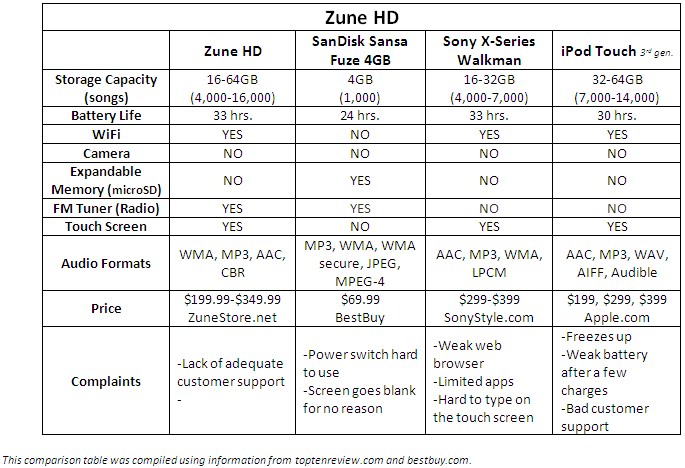
We are going to start with the Walkman W series. The W series is a unique mp3 player. This mp3 player eliminates the need for cables and wires. The mp3 device has combined the headphones to make 1 unit. The W series Walkman will hold nearly 2GB of music; that’s almost 1000 songs. The next mp3 player in the Walkman family is the E series. The E series can hold anywhere from 8-16GB of music and video. It also has an FM tuner built in. The battery life is impressive at 30 hrs of music play back and 4 hours video play back. The next Walkman is the S series. The S series is another unique mp3 player. They can play music, videos, and the radio just like the other. But the S series can also record voice and radio. The battery is beefed up holding up to a 42 hour charge with 6.5 hr of video play back. The last Walkman that we will be talking about is the X series. This is Sony’s attempt to rival the iPod Touch. In saying that, the X series is touch screen, Wi-Fi enabled, and has the same features the other Walkmans have. The X series is an awesome device. Like I said at the beginning of this article, Sony has always produced good products and the X series is no exception.


Enjoys the Walkman talk this week. Until next time, happy teching!

Thứ Ba, 1 tháng 6, 2010

iPod, meet the Zune


The Zune is Microsoft’s answer to the iPod. The first Zune was released in November 2006. Since its release, Zune has done its best in keeping up with the Apple iPods, but has not yet reached the popularity the iPod has. In saying that, Microsoft has given its portable music player some great features.


Today, there are 6 models of the Zune. Let’s start with the smallest first. The Zune 4 has 4 GB of memory which allows it to hold 1000 songs, 25,000 pictures, and 12 hrs of video. The big difference between the iPod nano and the Zune 4 is the Zune 4 can be wireless, which allows for wireless syncing and have access to the Zune Marketplace. Next is the Zune 8. The Zune 8 has 8 GB of memory which allows it to hold 2000 songs, 25,000 pictures, and 24 hrs or video. The Zune 8 can also use wifi. Next is the Zune 16 which allows up to 16 GB of storage; 4000 songs, 25000 pictures, and 48 hrs of video. After that comes the Zune 80. The Zune 80 allows you to store up to 80 GB of memory. This allows you to have 20000 songs, 25000 pictures, and 250 video hrs. The biggest Zune Microsoft sales is the Zune 120. This mp3 player allows you to store 30000 songs, 25000 pictures, and 375 hrs of video. So far, all of the Zunes we have talked about are able to access wifi connections. They all also have a built in radio. The final Zune we are going to discuss is the Zune HD. The Zune HD is the iPod touch’s biggest competitor. The HD is touch screen, wifi, and can download games, movies, and other cool stuff from the Zune Marketplace. The Zune HD can hold anywhere from 4000 songs – 16000 songs, 25000 pictures, and 22-96 hrs of HD movies.
Until Next time, happy teching!


Thứ Hai, 24 tháng 5, 2010

Portable Music Players: iPods


This week we are going to start our discussion on mp3 players; and what better way to start this discussion than by researching iPods. The first iPods were released in October 2001. These small portable music players could hold up to 1,000 songs, which at the time was a lot. Through the years the looks changed and customer satisfaction grew. Today, some of the iPod models are on their 6th generation. Today some of the models can view pictures, watch videos, and play/download games.

Today, there are 4 different iPod models: shuffle, nano, classic, and touch. Starting with the smallest iPod, the shuffle holds 2-4GB of music. That’s 500-1000 songs! The shuffle was designed to “plug and play.” When you turn the shuffle on it “shuffles” you music. Because of the simplicity of it, the battery life is good. Next in line is the iPod nano. The nano hold 8-16GB of songs and photos. As of 2009 the nano doubles as a camera. In fact, the nano can hold anywhere from 7,000-14,000 photos, 2,000-4,000 songs, and 8-16 hrs of video. This device is very popular because of its versatility. The next iPod is the classic. This iPod has kept its same look since it release. The classic holds 160GB of music (40,000 songs), photos (25,000 photos), and video (200 hrs. video). This iPod also costs you a pretty penny at $249. The last iPod we are going to discuss is the touch. The third generation touches is by far the coolest mp3 on the market and like the other does more than play music. The third gen. touch holds 32-64GB of music (7,000-14,000 songs), photos (40,000-90,000 songs), and video (40-80 hrs video). The touch can also download games from the App Store. In fact, there are few differences from the iPod touch and the iPhone (see our blog on the iPhone).

As you have read, the iPod is a nice device and in my opinion #1 when it comes to mp3 players. Until next time, happy teching!

Thứ Hai, 12 tháng 4, 2010

The iPad has Arrived ...


The iPad is Apple’s newest release of high tech portable devices. If you are familiar with Apple products, you might mistake the picture above left to be an iPhone, but you can’t make phone calls with it. If we were going by looks, we could say it looks a lot like an iPod Touch (right). Although there are some similarities, the iPad offers much more. Just like the iPod Touch, the iPad will also allow you to connect to WiFi and browse the web, watch YouTube videos, and download your favorite songs and TV shows from iTunes. The major difference between the two is battery life (up to 10 hours), the ability to download electronic books (iBooks), the dimensions are about 5 inches more in height and width and the ability to buy a smaller flash drive capacity (16GB).

In addition, the iPad was custom designed by Apple with an A4 1GHZ processor. The first release of the iPad due out April 3rd will be WiFi-enabled and will not require any type of contract with AT&T to fully use this device (i.e., wireless data plan). However, by later this month (late April 2010) you will be able to buy a 3G version of the iPad (appleinsider.com).

Unfortunately, the iPad falls short in that it does not have a camera or any video capabilities. According to InfoWorld.com, there are a few questions that Apple refuses to answer, such as its ability to transfer documents, can you use other media services other than iTunes like Netflix, can it be upgraded, can multiple apps be used at the same time, and will Flash work.


Here is a complete list of the preinstalled apps on the iPad. Join me tomorrow for Tech Tuesday as I travel to the Apple Store located within the Best buy store in Shreveport. There I will interview a Geek Squad agent about the success of the iPad since its release along with the other unanswered questions. Feel free this week to ask your own iPad questions using the Ask-A-Tech form in the right hand column. Until next time happy teching!

· Safari - web browsing
· Mail – email
· Photos – viewing photos
· YouTube – watching videos online
· iPod – listen to music
· iTunes – download songs, movies, TV shows, and more
· App Store – download apps such as games or health tips
· Maps – similar to Google Map
· Notes – jot down quick notes and information
· Calendar – manage your schedule
· Contacts – manage personal or business contacts

Thứ Tư, 17 tháng 6, 2009

Most Expensive Tech Toys at CES 2009

These most expensive tech toys debuted the 2009 Consumer Electronics Show in January of this year. Ironically, you will need to do your own research to find the true costs of these tech toys.

1. Samsung 6000, 7000 and 8000 Series LCD HDTV w/ LED lighting and Internet connectivity for Yahoo! widgets, faster refresh at 120 Hz (6000 and 7000 series and 240Hz (8000 series only). (pricing: varies)

2. Samsung BD-P4600 Blu-Ray, "thinnest blu-ray player in the world" at 1.5 inches thick, with WiFi capabilities, Internet streaming capabilities (NetFlix), digital media streaming capabilities (Pandora) and touch-sensitive controls. (pricing: varies)

3. Motorola Aura (cell phone) -with a sapphire crystal face and a rounded display screen (pricing: $2,000)

4. JVL Encore - a counter top entertainment system with a 22" screen for gaming and digital music streaming capabilities.

To learn more, please visit http://www.infosyncworld.com/news/n/10064.html

Thứ Năm, 22 tháng 1, 2009

iPod Touch?!?!


Today, I am going to be talking about the iPod Touch from Apple. The iPod Touch first appeared in 2005. It is much different than the traditional ipods, with an interface much like the iPhone (discussed in a previous blog). This ipod has a 3.5 inch touch screen, hence the name iPod Touch. The iPod Touch, itouch, also has a lot of similar features as the iPhone. (1) They look almost identical. The iPhone is a little longer and weights a bit more (as seen in the image to the left). (2) Both devices have Wi-Fi capabilities. The iPhone can access the Internet via the 3G network provided by AT&T. The itouch can only use Wi-Fi (802.11b/g). They also both have "Safari." Safari is MAC's Internet browser. Both the iPhone and itouch have the abilities to open full HTML web pages. This mean that you can pay bills, check scores, and watch YouTube straight from your iPod Touch. (3) Of course most people buy iPods for music and the itouch will not disappoint. You can store up to 1750 songs with the 8GB, 3500 songs with the 16GB, and 7000 songs with the 32GB version. You can also access iTunes from your iPod Touch, and when you find a song you like, you can purchase it as well. (4) I have one more feature I would like to discuss. The iPod Touch can access most of the iPhone applications; such as games, Wi-Fi finders, etc. Over all this is a great product. The 8GB iPod Touch starts around $229, 16GB = $299, and the 32GB = $399. So, if you are like me and don't have AT&T, then the iPod Touch is the way to go and much cheaper than canceling your contract (around $200) and getting an iPhone ($199 with a new contract plus the contracts monthly charges; $599 without).

Thứ Ba, 20 tháng 1, 2009

Wiiitis: The real pain behind gamers!

The other morning, I woke up to a soreness in my shoulder. Not only was it sore, but I could barely move it. I started thinking, "What did I do that made my shoulder so sore?" I sleep on my back so I knew that wasn't it. I haven't lifted anything heavy in a while. Nor have I been in any wrecks. Then it hit me, as I walked by my Nintendo Wii, the thought struck me. "Not the Wii," I told myself. I shrugged it off, got dressed, and headed to work. As the day progressed, my arm started to fell better. No pain and no soreness. When I got home that evening, I decided not to play the Wii incase I did hurt my shoulder some how. The next day when I woke up, all was fine. Again, no pain and no soreness. That night, my fiancée came over and wanted to play the Wii so, being the man I am, I had to throw in some competition. We played for around 2 hours. After losing to her in almost everything we played, she left. Shortly after that I went to sleep. To my surprise the next morning, the pain and soreness was back. That answered my question. The Wii was the cause of my shoulder pain; commonly known as "Wiiitis." Below is an article, where a doctor actually diagnosed "Wiiitis."

BOSTON (Reuters) - "When Dr. Julio Bonis awoke one Sunday morning with a sore shoulder, he could not figure out what he had done. It felt like a sports injury, but he had been a bit of a couch potato lately.
Then he remembered his new Wii.
Bonis, 29, had spent hours playing Nintendo's new video game in which players simulate real movements. Bonis had been playing simulated tennis.
It was not quite tennis elbow, he decided.
"The variant in this patient can be labelled more specifically as 'Wiiitis,'" Bonis, a family practice physician, wrote in a letter to the New England Journal of Medicine.
"The treatment consisted of ibuprofen for one week, as well as complete abstinence from playing Wii video games. The patient recovered fully."
Wiiitis -- pronounced "wee-eye-tis" -- is the latest ailment to develop from the video game era, beginning with Space Invaders' wrist in 1981, which was caused by the repeated button mashing required by the popular arcade game.
Nintendo's Wii game can captivate for hours and "unlike in the real sport, physical strength and endurance are not limiting factors," Bonis of the Research Group in Biomedical Informatics in Barcelona, Spain, wrote.
"What convinced me to send the case report was that a friend of mine, after playing 'Wii Sports' suffered from a similar complaint," Bonis told Reuters in an e-mail. "I have not found other cases in my clinical practice, but it is probably an underdiagnosed condition."
It is not the first time Nintendo has received attention in the medical field.
In 1990, a Wisconsin doctor characterized the thumb soreness brought on by pushing the buttons on a controller as "Nintendinitis" after it affected a 35-year-old woman who played a Nintendo game without interruption for five hours.
With virtual golf, boxing, baseball and bowling already on the market, "future games could involve different and unexpected groups of muscles," Bonis said. "Physicians should be aware that there may be multiple, possibly puzzling presentations of Wiiitis."
Bonis said he still plays the games, "but I try to use it with moderation. Sometimes it's hard to do!" "

Article: http://www.reuters.com/article/technologyNews/idUSN0616721120070606